Smoke alarm monitoring for housing companies
Alarmi holds the housing company’s smoke alarm register, test requests to residents, reminders, fault reports and dated summaries. Below you see the main ones in the real app, then every feature.
Staircase A · 18 apartments
17/18 apartments tested
Visit to apartment A 4: not home. Testing summary saved.
- Tested 17
- Waiting 0
- Not reached 1
Smoke alarm register
Once the apartments and alarms are in, every test and fault is recorded on the right home.

- Required number of alarms Alarmi works out from floor area and floors the minimum number of alarms each home needs.
- Import from Excel Paste floor areas and residents from Excel and check the rows before saving.
- Every alarm’s details Type, place, installation date, replacement date and full test history.
Testing
Every apartment gets its own test request by email or as a paper notice. A resident who got the email answers on a phone with no account.
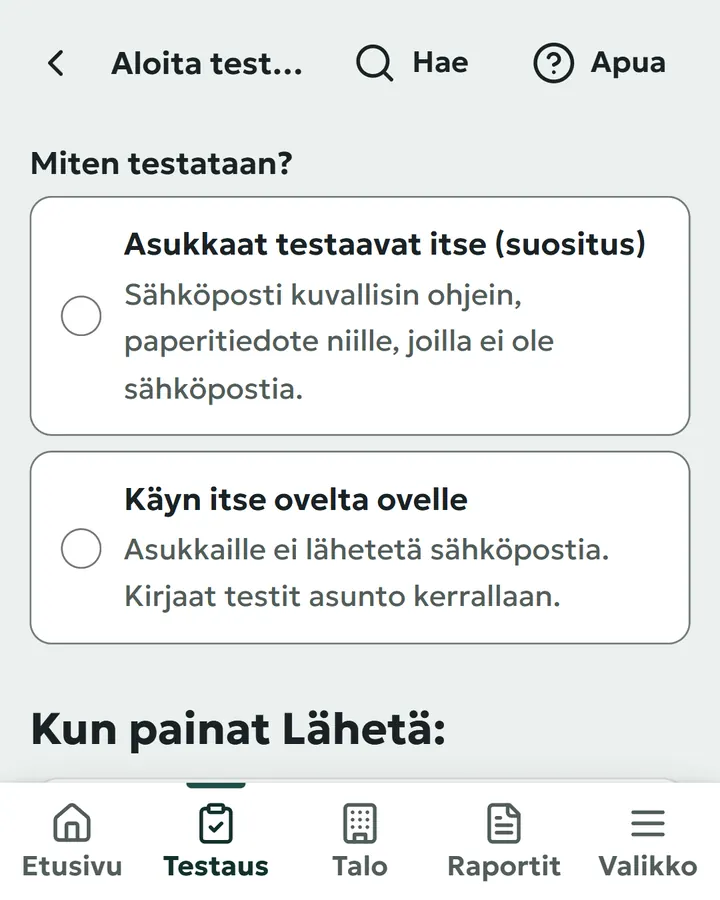
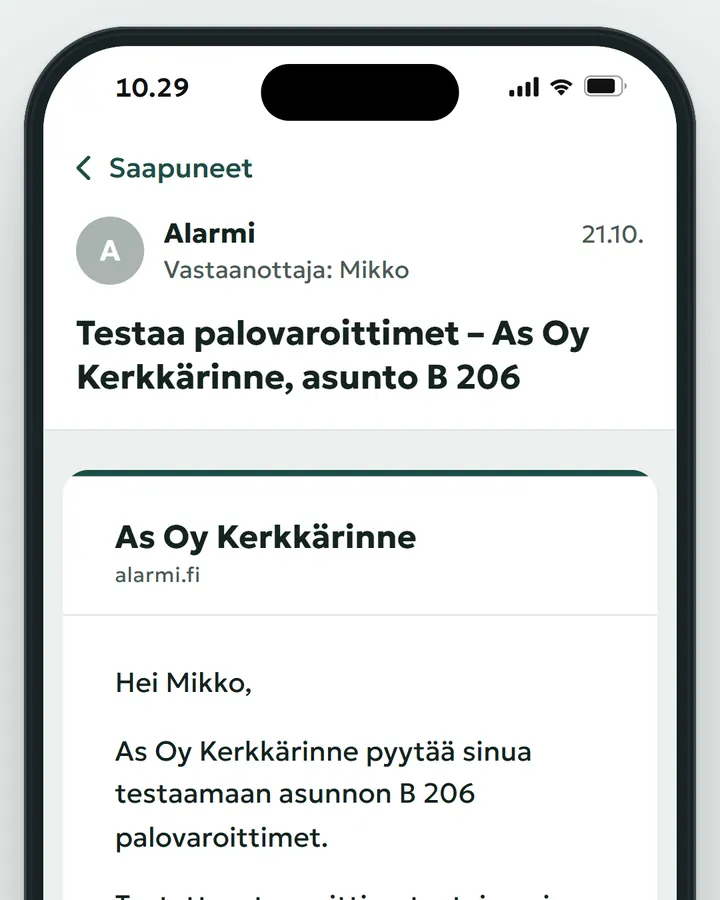
- A personal link by email Works for 14 days with no app or account.
- Three answers “Sounded, works”, “Did not sound properly” or “I need help testing”.
- Paper and phone calls in the same place Every result records how the answer came in.
Reminders and faults
Alarmi reminds only those who have not answered, and a “Did not sound properly” answer opens a numbered fault report.
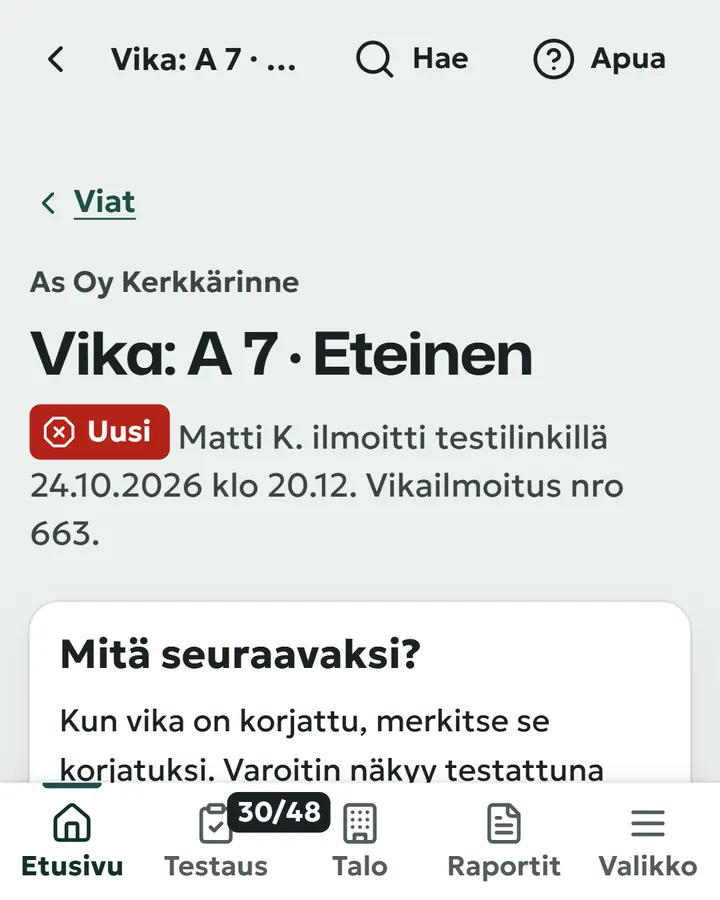
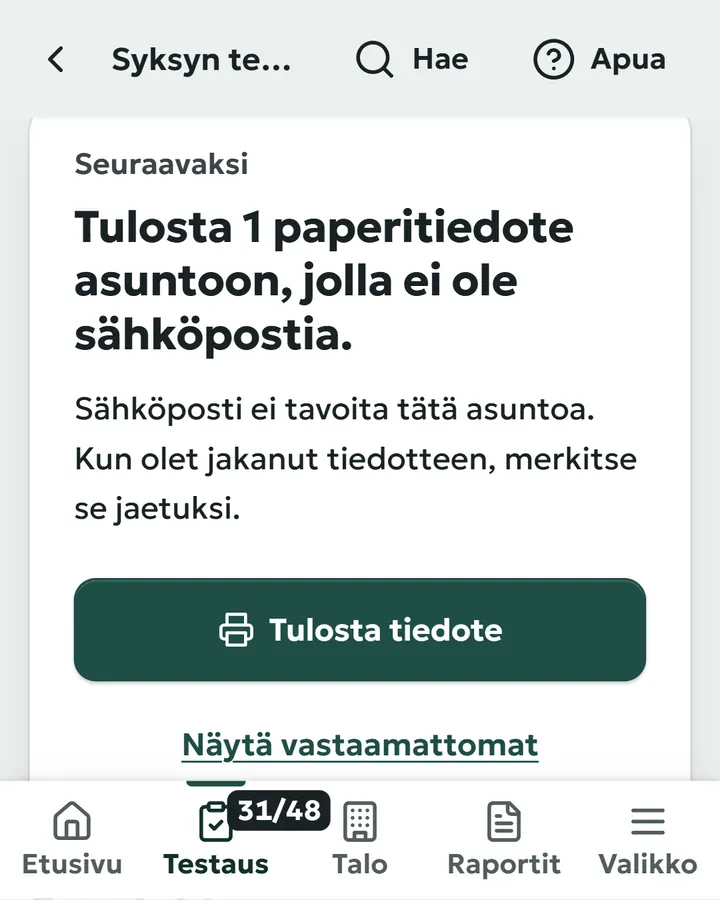
- Automatic reminders Only to those who have not answered, weekly, three messages at most.
- Paper notices and door to door A notice for homes without email, visits recorded on a phone.
- Fault report A numbered report stays open until you mark it fixed.
Reports: testing summary and smoke alarm report
A closed testing round is saved as a dated summary that cannot be changed afterwards.

- Testing summary Number, period, who saved it and the apartments left untested.
- Smoke alarm report On any day, for the board or the general meeting.
- History and CSV export Tests and changes as a list, residents and alarms to Excel.
For property managers
All your companies on one list, most urgent first, and the same work in many companies at once.

- Companies Each company’s testing, faults and unreached homes, most urgent first.
- Many companies at once Check the mailings, then start testing in the companies you chose.
- Printouts as one document Paper notices or summaries for the chosen companies in one go.
All features (142)
Every plan includes all features except apartment imports, resident imports from files and the property manager views, which are included in Pro and Salkku. Starter allows two users, but everything is available during the 14-day trial.
No matches. Try another word, such as “paper” or “report”.
Testing
15 features
-
Testing request
The resident receives a separate email with the apartment’s smoke alarms, numbered instructions and a link valid for 14 days. Apartments without email get a paper notice.
-
Visits and calls
Record every visit and call for an apartment: Not at home, No answer by phone, Promised to test, Visit agreed or your own note.
-
Testing summary
Ending a testing round saves a numbered and dated summary that cannot be changed. It can be printed or saved as a PDF from the browser.
-
Testing
Start a new testing round, open an ongoing one or view past rounds on the testing page.
-
Start testing
Choose the testing method and see who will receive an email or paper notice and how the message looks before sending it.
-
Send myself a test message
Receive the resident message in your own inbox first, without its link recording any answers.
-
Testing page
See each apartment’s status (Waiting, Not reached, Fault, Working) and record results one alarm at a time.
-
How was the information received?
Each result records how it was received, such as “Resident reported by phone” or “Resident returned a paper form”.
-
Mark all as working
The “Hallway and bedroom work” button records all untested alarms in the apartment as working at once.
-
Undo a record
Undo an incorrectly recorded test. The entry remains visible, crossed out and with a reason.
-
No response
The list of apartments not reached shows earlier contact attempts and lets you print paper notices.
-
Timeline
The timeline shows the latest testing events first and tells you who performed each action and how.
-
End testing
Before saving, see which apartments remain untested and how contact was attempted.
-
Ended testing round
The page for an ended round shows the saved summary and, separately, tests recorded after the round ended.
-
Testing interval
When the company’s testing interval has passed, alarms return to Waiting overnight, but no one receives a message until you start testing.
Reminders and messages
8 features
-
Automatic reminders
During testing, non-responders receive a reminder once a week, up to three messages including the testing request.
-
Battery reminder
Administrators receive an email 30 days before an alarm’s battery replacement is due.
-
Fault notification by email
When a resident reports a fault or asks for help, every administrator immediately receives an email with a direct link to the report.
-
Turn reminders off
Turn automatic reminders off in settings if you prefer to send reminders yourself.
-
Remind non-responders
Before sending a reminder yourself, see how many will be sent and who is excluded because of the message limit or a recent reminder.
-
Message residents
Write your own message to all residents or selected apartments and preview it with their actual details before sending.
-
Alarm replacement reminder
Administrators receive an email before an alarm’s replacement date, first with your chosen notice period and again 30 days before.
-
In the housing company’s name
Resident messages include the housing company’s name, its own reply address and a short explanation of Alarmi.
Resident view
9 features
-
Test link
The link works without an app or login details for 14 days, so residents can return and complete their answers later.
-
Resident page
Residents sign in through an emailed link to see their own alarms, fault reports and the housing company’s contact details.
-
Report a fault
Residents can report a fault with a photo on their own page and see the report number immediately.
-
Test the smoke alarms
For each alarm, the resident chooses “Sounded, works”, “Did not sound properly” or “I need help with testing”.
-
Which room is this alarm in?
If an alarm’s location is missing, the room chosen by the resident is saved in the register as their suggestion.
-
Send me a new link
When a link has expired, the resident can request a new one at the email address already on record.
-
In English / Suomeksi
Residents can switch their pages between Finnish and English.
-
Preview
Open the resident’s testing page with example alarms in Finnish or English without saving anything.
-
For residents
Every resident message links to a public page explaining who sent it, how to test and how to recognise a genuine message.
Paper notices and door-to-door testing
3 features
-
Paper notices
Print a separate notice for each apartment with its alarms, Working and Not working checkboxes, a deadline and contact details.
-
Door to door
Work through apartments one staircase at a time on your phone, record Working or Not working with large buttons and print notices for residents who were not home.
-
Yes, I distributed them today
When you mark notices as distributed, the distribution date is recorded for the apartment.
Faults and repairs
11 features
-
Fault report
A Not working answer immediately opens a numbered fault report. The resident also sees the number.
-
New, In progress and Repaired
The fault page shows its stages and who reported it, how and when.
-
Photos
Attach photos on the fault page or through the resident’s own reporting form.
-
Faults
See all faults in one list, most urgent first, and filter them by status or reporter.
-
Report a fault
Record a fault yourself and choose its type (such as No sound or Beeps on its own) and urgency.
-
I have seen this
Acknowledging a fault moves it to In progress, and you can tell the resident that the report has been received.
-
Mark as repaired
Record the repair (such as Battery replaced), but the alarm is shown as tested only after it has been tested following the repair.
-
Close as a duplicate
If another open report already covers the same fault, close the new report as a duplicate without changing the alarm’s status.
-
Tell the resident
Send the resident a message when the report is received and when the fault is repaired, each only once.
-
I need help with testing
Residents who cannot reach or hear an alarm can send a request for help, shown separately from faults.
-
Has the fault been repaired?
Alarmi does not close a fault automatically even if the alarm works in a later test. It asks whether the fault has been repaired.
Reports and files
9 features
-
Smoke alarm report
Get a smoke alarm report on any day for the board, the general meeting or the rescue department’s self-assessment.
-
Residents’ test confirmations
The smoke alarm report includes residents’ confirmations, each with the date, time, IP address and browser recorded.
-
Test history
All recorded tests appear in one list: when, which apartment and alarm, the result and who recorded it.
-
Reports
The Reports page contains the company’s yearly summaries, smoke alarm report and history of tests, messages and changes.
-
Change history
Every change and login is described in plain language: who did what and when.
-
Change history as an Excel file (CSV)
Download the change history as a CSV file and open it in Excel.
-
Residents (CSV)
Download residents’ names, contact details, apartments and move dates as a CSV file.
-
Alarms (CSV)
Download active alarms as a CSV file: location, type, model, installation date, replacement date and latest test.
-
Change history retention
Choose how long to retain change history (1, 2 or 5 years, or permanently). Test records are always retained.
Register
16 features
-
Required number of alarms
Alarmi calculates the number of alarms each apartment needs from its floor area and floors, according to Ministry of the Interior Decree 300/2025.
-
Smoke alarm details
Each alarm has a type, model, location, installation date, final replacement date and complete test history on record.
-
Shared spaces
Alarms in stairwells, cellars and laundry rooms are kept separate from apartments.
-
Building
The Building page contains the whole company in tabs: apartments as a list or grid, residents, alarms, shared spaces and the archive.
-
Filters
Filters show apartments with a fault or too few alarms and alarms that need replacement.
-
Add a building
Add an apartment block, terraced house or semi-detached house with numbered apartments in one form, or a detached house as one home.
-
Edit a building
On the building page, change its address, year of construction and other details, add staircases and remove empty ones.
-
Add apartments
Add several apartments at once by entering a range, such as A 1 – A 16. Existing numbers are skipped.
-
Edit directly in the list
Change floor areas and floors directly in the list and view each change later in the change history.
-
Apartment page
Each apartment has its own page with open faults, alarms, residents and a timeline of all tests, messages and visits.
-
Replaced with a new alarm
Recording a replacement retires the old alarm, adds the new one and closes the open fault.
-
Retire an alarm
A retired alarm remains with its tests and faults, so it can always be restored.
-
Attachments
Attach installation certificates and photos to an alarm. They are visible only to your organisation’s own users.
-
Archive
Companies, buildings and apartments are archived rather than deleted and can be restored.
-
Multiple housing companies
Manage several housing companies with one account: up to five with Pro or the agreed number with Salkku.
Pro and Salkku
-
Search
The top-bar search finds a company, address, apartment or resident and understands short forms such as a12.
Import from Excel
5 features
-
Import from Excel
Paste apartments from Excel or a CSV file and see which rows need correcting before saving.
Pro and Salkku
-
Paste residents from Excel
Paste residents from Excel, see each row’s status before saving and undo the import for 10 minutes.
-
I’ll import your data
If your apartment or resident list is already in Excel, send it to me and I’ll import it into Alarmi.
-
Paste floor areas from Excel
When adding a building, paste floor areas from Excel as a single column.
-
Upload residents from a file
Import residents from a CSV file with ä and ö preserved, even if the file was saved in Excel on Windows.
Pro and Salkku
Residents
6 features
-
Change of resident
Mark the previous resident as moved out and add the new resident in one step. The old links stop working.
-
Resident’s language
Each resident receives messages and sees their own pages in Finnish or English.
-
Delete personal data
After confirmation, the resident’s name, contact details and additional details are permanently deleted. Test records remain without the name.
-
Residents
Add residents and edit email addresses and phone numbers directly in the list, which also shows who receives a paper notice.
-
Resident details
The resident page contains their name, contact details, language and move date, plus whether they receive reminders.
-
Mark as moved out
Mark a resident as moved out and restore them if needed.
Home
7 features
-
Building drawing
The company is drawn as a building, with each window representing an apartment and showing its status by colour.
-
Next
One card tells you the next task, why it matters and what has already been done.
-
Annual calendar
The annual calendar shows the testing month and general meeting season, so you know when the next testing round is due.
-
This year’s tasks
The year’s stages, from details to testing requests, faults and the summary, are marked as done, in progress or not done.
-
Summaries
The home page shows the latest testing summary and a button for a report with today’s information.
-
Other tasks
Other open tasks, such as alarms due for replacement or missing information, appear below the next task.
-
Recent events
The latest events show with the apartment and how they happened, for example “Resident (A 5) answered via the test link: 2 working”.
Setup
7 features
-
First response
When the first resident confirms that an alarm works, the person who started the testing round receives one email.
-
Testing request sent
After sending, see a dated plan and a building drawing that fills in as residents respond.
-
Does every apartment have a smoke alarm?
One answer adds alarms to all apartments at once: either one each or the minimum based on floor area.
-
Setup
Across six named steps, the building drawing stays visible and you can continue later from where you left off.
-
Who receives the testing request?
Add residents in one of four ways: paste from Excel, type them in, send me the list or start with paper.
-
Send the first testing request
Finally, send the first testing request, including your own apartment if you wish, or choose I’ll send it later.
-
Continue setup
If setup is left unfinished, I send one message on the next working day telling you which step is waiting.
Trial
8 features
-
Price after the trial
On the account page, see your building and its price after the trial before anything is saved.
-
Read-only mode
After the trial, all data stays saved and visible, but changes and automatic messages wait until a plan is ordered.
-
Verification code
Verify the account with a six-digit code sent by email. Request it again or send it to a corrected address.
-
14-day trial
All features are available free for 14 days without a card.
-
Who are you?
The first step asks whether you handle matters as a board member or a property manager, so the questions fit your situation.
-
Let’s draw your building
Before providing personal details, enter the building’s basic details and see a drawing of it.
-
Trial time remaining
During the final week, a notice shows the remaining days. At the end, it explains how to extend the trial if testing is unfinished.
-
Trial ending
Administrators receive one email with a link to plan selection 1–3 days before the trial ends.
For property managers
9 features
-
Companies
The Companies table shows testing progress, faults and apartments not reached for every company, most urgent first.
Pro and Salkku
-
Testing: all companies
The season view groups companies as Not started, In progress, Ready to end and Ended.
Pro and Salkku
-
Print paper notices and summaries
Print the selected companies’ paper notices or summaries as one document.
Pro and Salkku
-
Tasks
The task list shows open tasks across all companies, most urgent first, each with its own button.
Pro and Salkku
-
Start testing
Review each company’s messages first, then start testing in several companies at once.
Pro and Salkku
-
Remind non-responders
Remind non-responders in selected companies at once and first see why anyone is excluded.
Pro and Salkku
-
Switch company
Use the top bar to go to a company’s own home page and back to the all-companies view.
Pro and Salkku
-
All companies
Residents, faults, testing rounds and latest summaries across all companies each have a single list.
Pro and Salkku
-
Salkku
For six or more housing companies: the annual price is €349 for five companies plus €49 for each additional company, plus VAT.
Salkku
Users and security
5 features
-
Sign in with a code
There are no passwords. Sign in with a six-digit code emailed to you, valid for 10 minutes.
-
Who can do what
Administrators edit information, send messages and record tests. Basic users can only view.
-
Privacy
The housing company is the controller of resident data. I (JL Screen Oy) process it on its behalf only for testing requests, reminders and faults.
-
Send an invitation
Invite board members or colleagues by email as administrators or basic users.
Starter: 2 users
-
Remove a user
Remove a user and restore them later without losing anything they have recorded.
Settings
3 features
-
Testing month
Choose the company’s testing month and whether testing takes place once or twice a year.
-
Company details
Save the company’s name, business ID, phone number and email address for residents to see in messages and on their own page.
-
My profile
Change your name, language and text size.
For the board
2 features
-
Take a proposal to the board
Get a one-page A4 proposal with the company’s name, price and ready-made wording for the minutes.
Free, no account
-
Stairwell notice
Before the first testing round, print a ready-made notice for the noticeboard with the company’s details and your own signature.
App and help
5 features
-
Undo and Restore
Undo almost any change immediately and restore removed items from the archive.
-
Text size
Choose normal or large text from the menu.
-
Install the app
Install Alarmi on a phone or computer like an app.
-
Kieli / Language
Every user can use Alarmi and its public pages in Finnish or English.
-
Help
The Help button provides instructions for the page you are on and a form for writing directly to me.
Subscription and billing
6 features
-
Plan and invoices
See your plan and its end date, how much of it is in use and which plans could suit you.
-
Upgrade during a subscription
When you upgrade from Starter to Pro during a subscription, you receive a new 12-month term and credit for the unused portion. When you move to Salkku, you pay the difference for the remaining term.
-
Reminders continue during invoicing
Automatic messages continue for 14 days after the term ends, allowing time to handle the invoice for the new term.
-
Confirm order
Order with an email invoice or e-invoice and see the exact amount before confirming. The plan starts immediately afterwards.
-
Switch to a cheaper plan
A cheaper plan takes effect automatically when the paid term ends unless you cancel the switch beforehand.
-
Calculate the price
Choose the number of companies on the pricing page and see the Salkku plan’s yearly and monthly price.
Free, no account
Free tools
8 features
-
Free inspection form and register (Excel)
Get a downloadable Excel template for the register, tests, faults and plan, plus a printable inspection form.
Free, no account
-
How many smoke alarms?
The calculator uses floor area and floors to show the minimum under Ministry of the Interior Decree 300/2025 and SPEK’s indicative estimate.
Free, no account
-
Smoke alarm maintenance plan
Fill in the model plan on the page and print it or download it as a Word file with wording for the board minutes.
Free, no account
-
Tools
All free tools are on one page in the order the board needs them.
Free, no account
-
Resident notice
Print a resident notice for Smoke Alarm Day on 1 December and edit its details before printing.
Free, no account
-
Articles
Guides explain responsibilities, testing, batteries and purchasing to boards and property managers.
Free, no account
-
Watch the demo
A one-minute video shows the real app with captions.
Free, no account
-
Contact
Messages from the contact form come directly to me.
Free, no account
Missing something your housing company needs?
Write to me about what you need. I answer myself, usually the same or the next working day.